Add-On: Managed Kubernetes
Mounting shared storage
The Kubernetes manifest file should use a persistentVolumeClaim with a name of pvc-<storage name>
Given a storage name of "storage1" that is attached to the cluster:

spec:
  containers:
    - name: my-container
      ...
     volumeMounts:
       - name: my-volume
         mountPath: /data
  volumes:
    - name: my-volume
      persistentVolumeClaim:
        claimName: pvc-storage1
The shared storage will be available within the pod at /data
Using Open ID Connect (OIDC) for Authentication
Our control-plane exposes the standard Kubernetes OIDC authentication flow: every API request can be validated against an external OpenID Connect Identity Provider (IdP).
Key Benefits
Benefit | Why it matters |
|---|---|
Single Sign-On & MFA | Re-use the organization’s IdP (Okta, Azure AD, Google Workspace, Auth0, Keycloak, etc.) so users log in the same way they do everywhere else. |
Centralized RBAC | Cluster RBAC rules map directly to IdP groups/claims—no per-cluster user management. |
Token security | Short-lived, signed JWTs replace long-lived kubeconfig certificates. |
Token security | Short-lived, signed JWTs replace long-lived kubeconfig certificates. |
Internally, the control plane starts the API server with the standard --authentication-config flag, so the behavior matches upstream Kubernetes.
Prerequisites
An OIDC-compliant IdP with discovery enabled (
/.well-known/openid-configurationmust be resolvable from the control plane)
Creating the AuthenticationConfiguration manifest
Upstream Kubernetes documents the expected structure and inputs of the AuthenticationConfiguration manifest. As a minimal example:
apiVersion: apiserver.config.k8s.io/v1beta1
kind: AuthenticationConfiguration
jwt:
  - issuer:
      url: https://accounts.google.com
      audiences:
        - <YOUR_AUDIENCE>.apps.googleusercontent.com
      audienceMatchPolicy: MatchAny
    claimMappings:
      username:
        claim: email
        prefix: ""
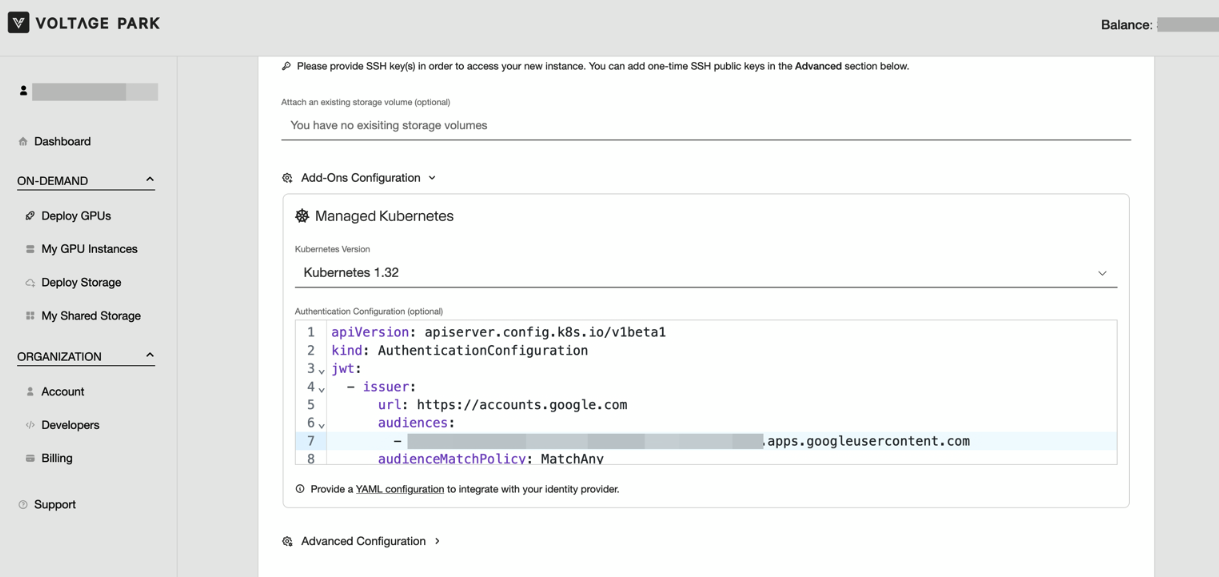
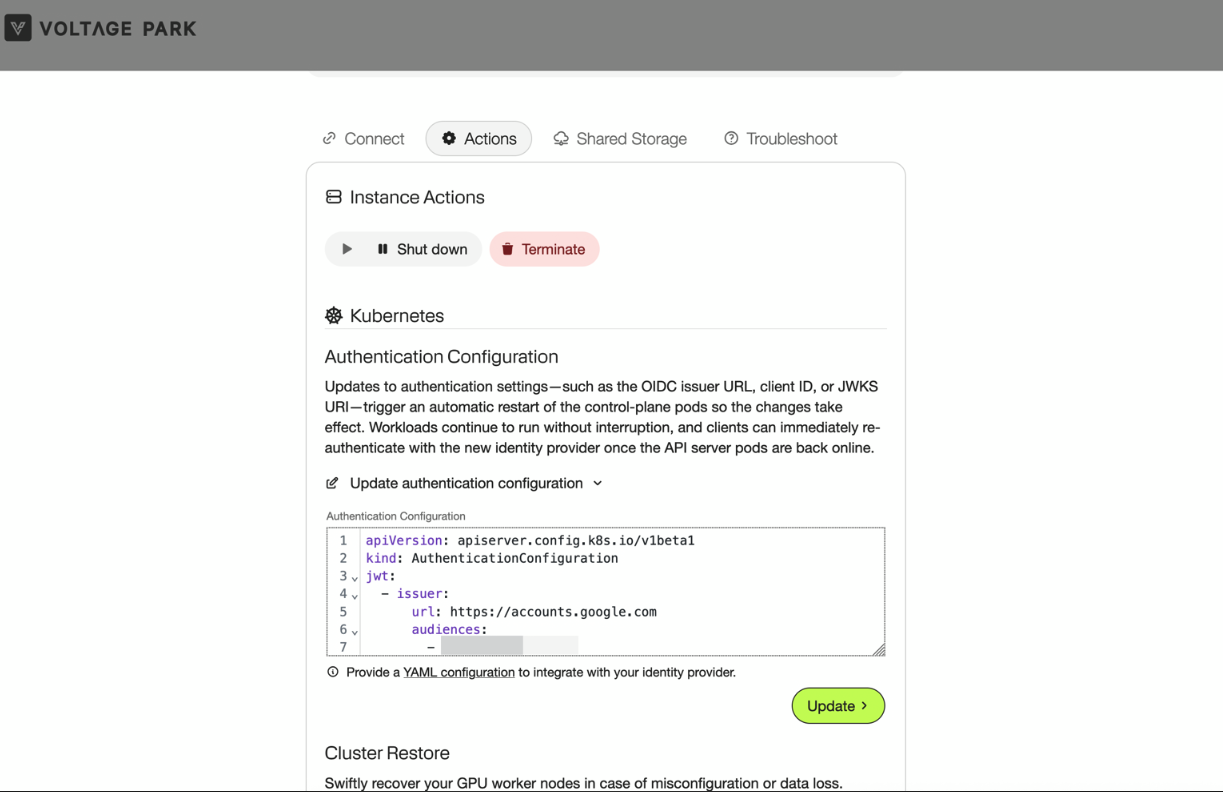
This configuration can be supplied during cluster creation or updated later via the instance actions on the console.
Supply During Creation
Update from Instance Details
Configuring User Access (RBAC)
Once the control plane trusts your IdP, you map IdP claims to Kubernetes roles exactly like any other subject. This can be done using the kubeconfig supplied to you during cluster creation.
Following our example from above, we could apply the following manifest to grant alice@example.com permission to view resources in the cluster.
apiVersion: rbac.authorization.k8s.io/v1
kind: ClusterRoleBinding
metadata:
  name: example-crb
roleRef:
  apiGroup: rbac.authorization.k8s.io
  kind: ClusterRole
  name: view
subjects:
- kind: User
  name: "alice@example.com"
  apiGroup: rbac.authorization.k8s.io
Logging In from kubectl
The simplest client is kubelogin.
Install the client
brew install kubeloginConvert the provided
kubeconfig. This injects an exec credential plugin entry; The firstkubectlrun opens a browser, performs the OIDC flow, and caches the ID token. Later requests refresh tokens automatically as needed. For example:# Create a new user kubectl --kubeconfig=/path/to/kubeconfig.yaml config set-credentials alice-oidc \ --exec-interactive-mode=Never \ --exec-api-version=client.authentication.k8s.io/v1 \ --exec-command=kubectl \ --exec-arg=oidc-login \ --exec-arg=get-token \ --exec-arg=--oidc-issuer-url=https://accounts.google.com \ --exec-arg=--oidc-client-id=<YOUR_AUDIENCE>.apps.googleusercontent.com \ --exec-arg=--oidc-extra-scope=profile \ --exec-arg=--oidc-extra-scope=email \ --exec-arg=--oidc-client-secret=<YOUR_SECRET> # Create a new kubeconfig without the static credentials kubectl --kubeconfig=/tmp/test.yaml config set-context --current --user=alice-oidc kubectl --kubeconfig=/tmp/test.yaml config view --minify --flatten > kubeconfig-alice.yamlVerify access
kubectl --kubeconfig=kubeconfig-alice.yaml auth can-i get pods